Why a strong starter matters – and where people stumble
The first 30 seconds of a YouTube channel are the make‑or‑break moment. Viewers decide in a flash whether they’ll subscribe, click another video, or scroll on. A well‑crafted starter (the opening video plus its accompanying channel description) gives a clear promise, showcases personality, and sets expectations for the content that follows.
Most creators trip over three common hurdles:
- Vague value proposition – “I make videos about tech” is too broad.
- Over‑loading information – cramming every topic, schedule, and call‑to‑action into a single sentence.
- Missing a personal hook – the audience never learns who the creator is or why they should care.
The guide below walks you through a repeatable process that leaves you with a concise channel starter.
Step by Step
- Define the core promise (30 seconds, 1 sentence).
Write a single sentence that answers: What will the viewer gain from this channel? Focus on the end result, not the process. Example: “I help busy professionals master Excel shortcuts in under five minutes.”
- Identify the target persona (1‑2 short descriptors).
Pinpoint who you’re speaking to. Use concrete traits: “mid‑level marketers who spend 10 hours a week on data reporting.” This keeps the language tight and avoids generic “everyone.”
- Craft a personal hook (15‑20 seconds).
Share a brief anecdote or credential that establishes credibility and relatability. “Two years ago I was drowning in spreadsheets; now I’ve saved 12 hours a month by automating routine tasks.”
- Outline the content cadence (10 seconds).
State how often new videos appear and the format they’ll take. “New tutorials drop every Tuesday, each under three minutes.” Consistency builds trust.
- Write a clear call‑to‑action (5‑10 seconds).
Ask for one specific action: subscribe, hit the notification bell, or watch the next video. “If you want to reclaim hours from data entry, hit Subscribe and turn on notifications.”
- Script the visual and audio cues.
Pair each spoken line with a visual cue: on‑screen text, a quick cut, or a graphic. For the personal hook, show a before‑and‑after screenshot; for the cadence, flash a calendar icon.
- Polish for timing and tone.
Read the script aloud while timing it. Aim for 55‑65 seconds total. Trim filler words, replace jargon with plain language, and ensure the tone matches your brand (friendly, authoritative, playful, etc.).
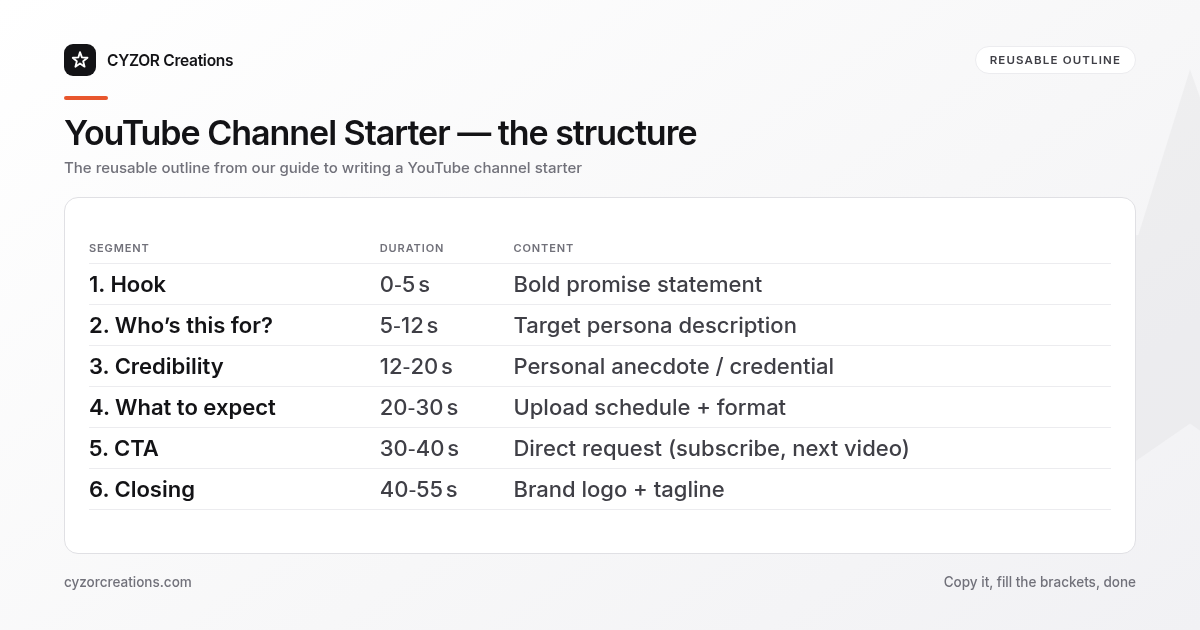
A Simple Structure to Follow
| Segment | Duration | Content | Visual cue |
|---|---|---|---|
| 1. Hook | 0‑5 s | Bold promise statement | Large text overlay |
| 2. Who’s this for? | 5‑12 s | Target persona description | Quick cut to relatable scenario |
| 3. Credibility | 12‑20 s | Personal anecdote / credential | Photo or screen capture |
| 4. What to expect | 20‑30 s | Upload schedule + format | Calendar icon + thumbnail montage |
| 5. CTA | 30‑40 s | Direct request (subscribe, next video) | Button graphic + animation |
| 6. Closing | 40‑55 s | Brand logo + tagline | Fade‑out with music |
You can reuse this outline for every new channel launch or for a re‑branding sprint. Simply swap the specifics (persona, schedule, anecdote) while keeping the skeleton intact.
Common Mistakes to Avoid
- Listing every topic you’ll cover. Viewers get overwhelmed; pick the top three pillars and expand later.
- Speaking in a monotone script. A robotic delivery kills engagement; inject natural pauses and inflection.
- Leaving the CTA until the very end of the video. If the viewer decides to leave before the final seconds, the ask never lands.
- Using industry jargon without explanation. Assume no prior knowledge; replace “KPIs” with “key performance indicators.”
- Neglecting the channel description text. The written description should echo the video promise and include searchable keywords.
A Short Example
> [On‑screen: bold text “Master Excel in 5 Minutes a Day”]
> “Hey, I’m Maya. Two years ago I was stuck in a spreadsheet nightmare, losing hours to manual data entry. I cracked the shortcut system that now saves me 12 hours a month, and I’m sharing those exact tricks with you.
>
> Every Tuesday I drop a bite‑size tutorial—under three minutes, no fluff. If you’re a busy marketer who needs clean data fast, hit Subscribe and tap the bell so you never miss a shortcut.
>
> [Logo appears, tagline “Work Smarter, Not Harder” fades in]
The accompanying channel description reads:
“Quick Excel shortcuts for busy marketers. New tutorials every Tuesday. Subscribe for weekly time‑saving hacks.”
Pro Tips
- Batch‑record the intro once and reuse it. Keep the same footage for the next six months; only the thumbnail needs updating.
- Test the script with a friend who matches your persona. Ask them to summarize the channel’s value in one sentence; if they can’t, tighten the promise.
- Add a subtle branding element (color, font, sound). Consistency across the intro, thumbnails, and end screens reinforces recall.
- Include a “next video” teaser at the very end. A quick cut to the upcoming tutorial gives a reason to stay on the channel beyond the starter.
- Monitor retention analytics for the first 60 seconds. If viewers drop off before the CTA, move the CTA earlier in the script.
The result is a clear, professional first impression that sets the tone for every video that follows.