Why a clear pitch deck copy matters (and where writers stumble)
A pitch deck is the first conversation you have with investors, partners, or even internal stakeholders. The copy you place on each slide is what turns raw data into a story. When the wording is vague, jargon‑laden, or mis‑aligned with the visual layout, the audience’s attention drifts, and the core message gets lost. Most founders report two pain points: (1) knowing what to say on each slide without sounding like a brochure, and (2) keeping the copy tight enough to fit the limited space while still delivering impact. The guide below walks you through a repeatable process that resolves both issues.
Step by Step
- Define the single‑sentence hook
Write a one‑liner that captures the problem you solve, the market you target, and the unique advantage you bring. Test it on three people who are not familiar with your industry; if they can repeat it after a minute, you have a solid hook.
- Map the audience’s decision journey
Sketch a three‑stage flow: Problem awareness → Solution validation → Investment rationale. For each stage, note the key question the audience will ask (e.g., “Is this a real pain?”). Your copy must answer those questions directly.
- Draft bullet‑level content for every slide
Open a plain‑text file and list each slide title (Problem, Market, Product, Business Model, Traction, Team, Ask). Under each title, write 3–5 bullet points that answer the stage‑specific question. Keep each bullet under 20 words; this forces clarity.
- Trim for visual parity
Transfer the bullets onto your slide template. If a bullet spills over the allotted text box, rewrite it using active verbs and numbers. Replace “We have a strong team” with “Team: 2 ex‑FAANG engineers, 1 serial entrepreneur”.
- Add data‑driven proof points
For every claim, attach a concrete metric: “$1.2M ARR in 12 months” or “30% month‑over‑month growth”. Insert the metric as a bolded figure within the sentence to draw the eye.
- Create a narrative thread
Write a transition sentence that links each slide to the next. For example, after the Market slide, add: “With a $5B addressable market, our solution captures the fastest‑growing segment.” Place this sentence in a smaller font at the bottom of the slide or as a spoken cue.
- Run a 30‑second read‑through
Set a timer, advance slides automatically, and read the copy aloud. If you stumble on any phrase, rewrite it. The goal is a smooth, conversational cadence that could be delivered in a single elevator pitch.
A Simple Structure to Follow
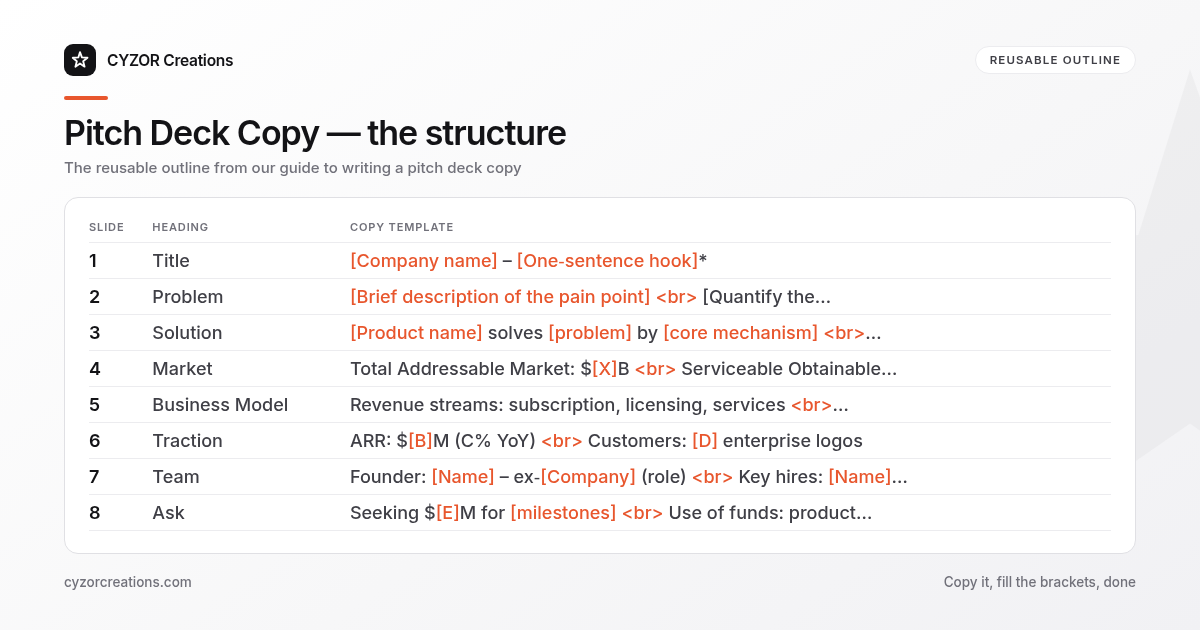
Below is a reusable outline you can copy into any new deck. Replace the bracketed placeholders with your own data.
| Slide | Heading | Copy Template |
|---|---|---|
| 1 | Title | [Company name] – [One‑sentence hook]* |
| 2 | Problem | [Brief description of the pain point] <br> [Quantify the impact: e.g., “X % of Y experience Z”] |
| 3 | Solution | [Product name] solves [problem] by [core mechanism] <br> [Key benefit: “reduces cost by 30 %”] |
| 4 | Market | Total Addressable Market: $[X]B <br> Serviceable Obtainable Market: $[Y]M |
| 5 | Business Model | Revenue streams: subscription, licensing, services <br> Pricing: $[A] per user/month |
| 6 | Traction | ARR: $[B]M (C% YoY) <br> Customers: [D] enterprise logos |
| 7 | Team | Founder: [Name] – ex‑[Company] (role) <br> Key hires: [Name] – [skill] |
| 8 | Ask | Seeking $[E]M for [milestones] <br> Use of funds: product (X%), sales (Y%), ops (Z%) |
Each bullet stays under 20 words, and every slide contains at most two bolded figures. This keeps the visual hierarchy clean and the copy scannable.
Common Mistakes to Avoid
- Overloading slides with paragraphs – a slide is a visual cue, not a report.
- Using vague adjectives (“innovative”, “cutting‑edge”) without backing them with numbers.
- Repeating the same phrase on multiple slides – it feels lazy and wastes space.
- Neglecting the audience’s perspective – writing what you think is cool instead of what the investor needs to know.
- Leaving placeholders in the final deck – “TBD” or “Lorem ipsum” instantly kills credibility.
A Short Example
> Slide 3 – Solution
> EcoTrack reduces commercial building energy waste by 25 % using AI‑driven sensor analytics.
> Installation takes 2 hours, no retro‑fit required.
> Customers see ROI in 6 months on average.
Notice the three elements: a quantifiable benefit, a concrete implementation detail, and a timeline for return on investment. All statements are under 20 words and each contains a bolded figure when placed on the slide.
Pro Tips
- Lead with numbers – start every bullet that contains data with the figure (e.g., “$3M ARR” rather than “We have $3M ARR”). The eye naturally scans left‑to‑right, so the metric lands first.
- Use active voice and present tense – “Our platform predicts” reads stronger than “Our platform is designed to predict”. It conveys confidence and immediacy.
- Align copy length with slide layout – if a slide uses a full‑width image, limit the text to a single, punchy line. Conversely, a text‑heavy slide can accommodate two short bullets, but never more than three.
- Create a “copy cheat sheet” – maintain a spreadsheet of reusable phrases (“reduces churn by X %”, “scales to Y users”) and swap in the appropriate numbers for each new deck. This speeds up iteration while preserving consistency.
- Test on a non‑technical friend – ask them to summarize each slide in one sentence. If they can’t, the copy is still too dense or jargon‑laden.
Follow the steps, stick to the template, and polish each line until it reads like a spoken pitch. The result is a deck that tells a tight story, respects the limited screen real estate, and gives investors exactly the information they need to decide.